
Last updated on
Oct 31, 2026
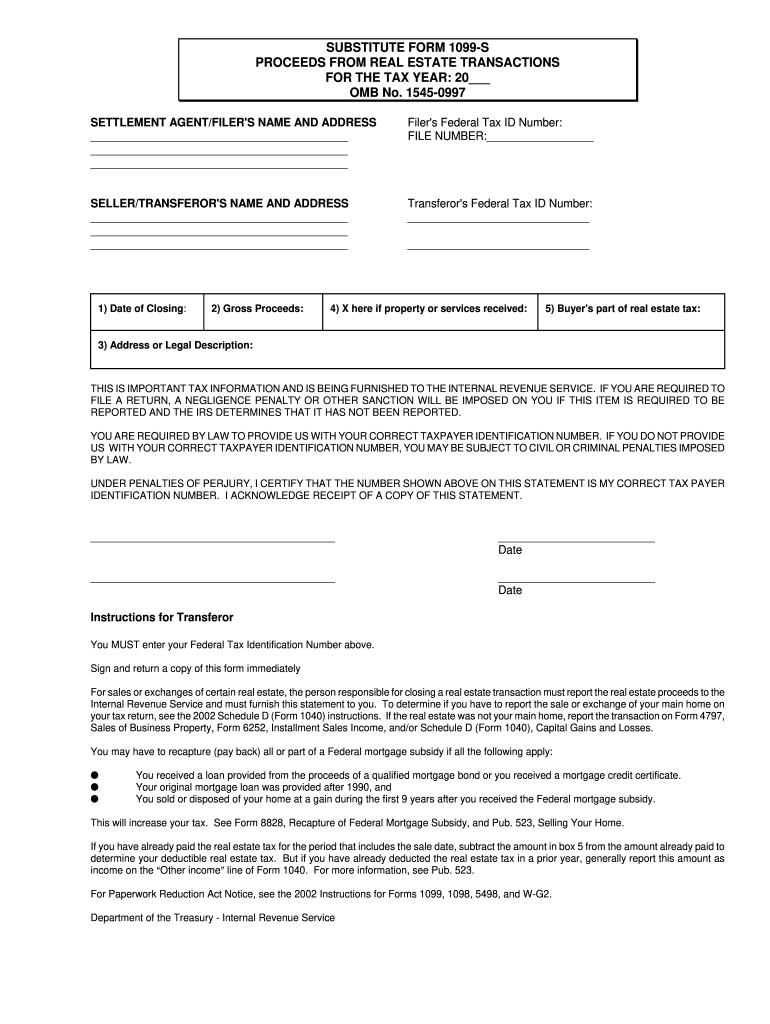
IRS 1099-S Substitute Form free printable template
pdfFiller is not affiliated with IRS

Fill out
Complete the form online in a simple drag-and-drop editor.

eSign
Add your legally binding signature or send the form for signing.

Share
Share the form via a link, letting anyone fill it out from any device.

Export
Download, print, email, or move the form to your cloud storage.
Why pdfFiller is the best tool for your documents and forms


End-to-end document management
From editing and signing to collaboration and tracking, pdfFiller has everything you need to get your documents done quickly and efficiently.
Accessible from anywhere
pdfFiller is fully cloud-based. This means you can edit, sign, and share documents from anywhere using your computer, smartphone, or tablet.
Secure and compliant
pdfFiller lets you securely manage documents following global laws like ESIGN, CCPA, and GDPR. It's also HIPAA and SOC 2 compliant.
What is IRS 1099-S Substitute Form
The Form 1099-S Template is a tax document used by sellers or transferors to report proceeds from real estate transactions to the IRS.
pdfFiller scores top ratings on review platforms




Good service and I use it every day! Thanks!
It is very user friendly and well priced!
Who needs IRS 1099-S Substitute Form?
Explore how professionals across industries use pdfFiller.

IRS 1099-S Substitute Form is needed by:
-
Real estate sellers or transferors
-
Settlement agents and filers
-
Tax professionals handling real estate transactions
-
Individuals filing federal tax returns
-
Accountants preparing tax documents
Comprehensive Guide to IRS 1099-S Substitute Form
What is the Form 1099-S Template?
The Form 1099-S is a crucial tax document utilized in reporting proceeds from real estate transactions to the Internal Revenue Service (IRS). This specific form is essential for sellers and transferors, as it helps ensure accurate tax reporting on the sale of real estate. Typically completed by settlement agents or filers, the form must be provided to the seller or transferor, encompassing important information necessary for tax purposes, including the seller's federal tax ID number, transaction details, and signatures.
Understanding the Form 1099-S template is vital for participants in real estate transactions. This form plays a significant role in documenting the financial aspects of property sales, making it indispensable for compliance with tax regulations.
Purpose and Benefits of the Form 1099-S Template
Sellers need the Form 1099-S template primarily for IRS reporting to disclose proceeds from real estate transactions accurately. Utilizing this form ensures that sellers fulfill their tax obligations while benefiting from a streamlined process. Properly completing and submitting the Form 1099-S allows for clarity and avoids potential conflicts during tax audits.
Among the primary benefits of timely filing the Form 1099-S are reduced risk of penalties, avoidance of filing discrepancies, and peace of mind knowing that tax responsibilities are met efficiently. An accurate report can help in swift processing during federal reviews, which is beneficial for both individual sellers and transferors.
Who Needs the Form 1099-S Template?
The Form 1099-S is mandatory for specific individuals and entities involved in real estate transactions, primarily including sellers or transferors. To qualify for using the form, sellers must be engaged in the sale of real property, which may include residential homes, commercial buildings, or parcels of land.
Scenarios necessitating the use of this form include any real estate sales where proceeds exceed a certain threshold. Failure to provide this form can result in significant implications, including potential penalties for non-compliance with IRS reporting requirements. Understanding these eligibility criteria helps sellers navigate their tax responsibilities effectively.
How to Fill Out the Form 1099-S Template Online (Step-by-Step)
Filling out the Form 1099-S template online is straightforward, and following these steps can simplify the process:
-
Access PDF filler and select the Form 1099-S template.
-
Fill out the 'Filer's Federal Tax ID Number' section accurately.
-
Complete the 'Seller/Transferor's Name and Address' and other required fields.
-
Enter details such as 'Date of Closing' and 'Gross Proceeds.'
-
Review all entries to ensure accuracy, then proceed to eSign if required.
-
Save and submit the completed form as directed.
Each key section of the form is important for compliance, particularly details like the gross proceeds, which significantly affect tax reporting during the filing process.
Common Errors and How to Avoid Them
While filling out the Form 1099-S template, several common errors can occur, leading to processing delays or rejections. Some frequent mistakes include inaccuracies in the federal tax ID numbers, wrong names, or misreported amounts. To mitigate these issues, it is essential to double-check all filed information prior to submission.
Tips for avoiding such errors include validating the seller's information against official documents and utilizing automated tools provided by platforms like PDF filler, which assist in ensuring accuracy and compliance with IRS expectations.
Submission Methods and Delivery for the Form 1099-S Template
Once the Form 1099-S template is completed, there are various submission methods available. Users can choose between e-filing and paper filing, depending on their preference and the specific requirements applicable to their transactions. E-filing is often quicker and can assist in expediting the overall processing time.
It's essential to be aware of deadlines for submission to avoid any potential penalties that may arise from late filings. Regularly checking IRS guidelines can also help ensure compliance with overall submission regulations.
Security and Compliance for the Form 1099-S Template
When handling sensitive documents, such as the Form 1099-S, security and compliance should be paramount. PDF filler utilizes 256-bit encryption technology to safeguard your information and ensure privacy during completion and submission. Adhering to best practices regarding data protection is vital for users, given the sensitive nature of financial and personal details involved.
Furthermore, understanding compliance with IRS regulations during the handling of tax documents helps mitigate risks associated with potential audits. Users can feel confident in the compliance capabilities provided through platforms like PDF filler.
Sample or Example of a Completed Form 1099-S Template
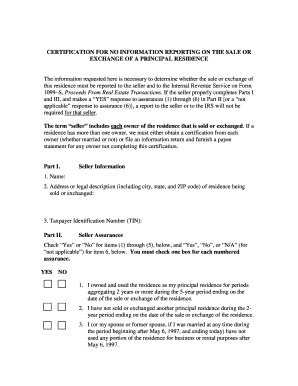
Providing a filled-out example of the Form 1099-S can serve as a valuable visual resource for users. This illustration helps clarify how each field should be completed, specifically in the context of real estate transactions.
Understanding the significance of each field is crucial, as it determines the overall accuracy of the information reported. Accessing a sample form can enhance user confidence when filing their own documentation.
Using pdfFiller to Make Filling Out the Form 1099-S Easier
pdfFiller offers an array of features designed to simplify the process of managing tax documentation, including the Form 1099-S template. Its user-friendly interface allows individuals to edit text, eSign, and share their forms effortlessly, making the tax filing process more accessible.
The platform not only facilitates smoother filing with its editing capabilities but also emphasizes security features that ensure sensitive data remains protected throughout the process. By leveraging pdfFiller, users can approach their documentation tasks with increased confidence and peace of mind.
How to Fill Out Small Business Tax Forms Online with pdfFiller
Struggling with your Schedule C or not sure how to file business taxes as a sole proprietor, LLC, or self-employed professional? This step-by-step pdfFiller tutorial walks you through completing IRS Schedule C quickly and accurately — no printing, no scanning, no stress. Whether you're handling small business tax deductions, tracking self-employed taxes, or preparing your full business tax return, pdfFiller makes it simple right in your browser.

How to fill out the IRS 1099-S Substitute Form
-
1.To begin, access pdfFiller and search for 'Form 1099-S Template' in the templates section. Open the form in the editing interface to get started.
-
2.Review the form layout to understand the fields available. Look for the sections where you need to input data such as the filer's federal tax ID number and details about the closing date.
-
3.Before filling out the form, gather essential information such as the seller's taxpayer identification number, transaction details, and the gross proceeds from the sale.
-
4.Once you have all necessary information, click on the text fields in pdfFiller to input your data. Each field will provide guidance on what details are needed.
-
5.Ensure you fill in all mandatory fields, double-check for accuracy, and reference any additional documents required for your tax submission.
-
6.After completing the form, take a moment to review the information entered. Use the preview option in pdfFiller to verify that all details are correct.
-
7.Finally, save your completed Form 1099-S. You can download a copy for your records or directly submit it through the available submission options on pdfFiller.

Who needs to file the Form 1099-S?
The Form 1099-S must be filed by sellers or transferors of real estate transactions, as well as by settlement agents or filers involved in the transaction.
What information is required to complete Form 1099-S?
To complete Form 1099-S, you will need to include the filer's federal tax ID number, seller/transferor's details, gross proceeds amount, and the date of closing, among other required information.
Is there a deadline for filing Form 1099-S?
Yes, Form 1099-S must typically be filed by January 31 of the year following the real estate transaction. Ensure timely submission to avoid penalties.
How do I submit Form 1099-S after completion?
You can submit Form 1099-S electronically through IRS e-file or by mailing a paper copy to the IRS. Ensure to keep a copy for your records.
What common mistakes should I avoid when filling out Form 1099-S?
Common mistakes include incorrect taxpayer identification numbers, failing to sign the form, and leaving out required details. Double-check all entries before submission.
What supporting documents do I need when filing Form 1099-S?
It's advisable to have supporting documents like the closing statement, records of gross proceeds, and any correspondence that verifies the transaction for accurate reporting.
How long does it take to process Form 1099-S?
Processing times for Form 1099-S can vary, but generally allow several weeks for the IRS to process your submission, especially during peak tax season.
Related Content
Related Forms


Related Catalogs
Get the latest insights from our blog


If you believe that this page should be taken down, please follow our DMCA take down process
here
.
This form may include fields for payment information. Data entered in these fields is not covered by PCI DSS compliance.